
Download DFCC iConnect APK – Mobile Banking, Corporate Finance, Secure Transactions, Online Banking
Overview
The DFCC iConnect APK is a mobile banking application developed by DFCC Bank PLC, designed specifically for corporate clients in Bangladesh. As the first mobile banking solution tailored for businesses of all sizes in the country, it offers a secure and intuitive platform for managing financial operations on the go. The app enables users to perform essential banking tasks such as fund transfers, balance inquiries, and transaction history reviews, all from a smartphone. Its primary purpose is to provide a reliable, real-time financial management tool that supports business continuity and operational efficiency, especially for companies that require immediate access to their accounts.
Target users include small and medium enterprises (SMEs), large corporations, and business owners who rely on timely financial decisions. The application is built with a user-friendly interface, allowing even non-technical users to navigate its features without difficulty. It supports both online and offline functionality, ensuring access to critical information even in low-connectivity environments. This makes it particularly useful for field-based business operations or remote offices. The app is positioned as a secure digital alternative to traditional banking methods, reducing dependency on physical branches and enhancing financial control for corporate clients.
Key Features & Capabilities
- Secure Fund Transfers: Enables instant money transfers to any bank account within Bangladesh with built-in security protocols to protect financial data.
- Account Balance Checking: Provides real-time access to current account balances, helping users monitor cash flow at any time.
- Transaction History Access: Allows users to review past transactions, supporting accounting and reconciliation processes.
- Corporate Account Management: Offers tools to manage multiple business accounts from a single interface, streamlining financial oversight.
- Offline Mode Functionality: Supports limited operations without an internet connection, ensuring continued access to essential data during connectivity issues.
- User-Friendly Interface: Designed with simplicity in mind, minimizing the learning curve for new users and improving workflow efficiency.
These capabilities are particularly valuable in fast-paced business environments where quick access to financial data is crucial. For example, a business owner can verify a payment’s status while traveling, or a finance manager can approve a transaction during a meeting without needing to return to the office. The app’s secure architecture ensures that sensitive financial operations are protected from unauthorized access, making it a trusted tool for managing corporate finances remotely.
User Interface, Workflow & Performance
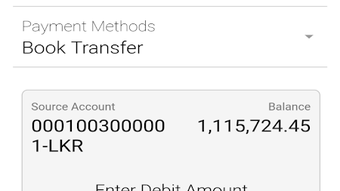
The user interface of DFCC iConnect is structured around simplicity and clarity, featuring a clean layout with clearly labeled icons and menus. Navigation is intuitive, allowing users to move between key functions—such as transfers, balances, and history—without confusion. The workflow is designed to minimize steps required to complete common tasks, such as initiating a transfer, which can typically be done in a few taps after authentication.
While specific performance metrics such as CPU or RAM usage were not provided, the app is described as responsive and efficient in handling routine banking operations. It is built to maintain stability across various Android devices, supporting smooth operation even during high-traffic periods. The developer did not specify resource usage details, so actual performance may vary depending on device capabilities and network conditions. However, the inclusion of offline functionality suggests that the app is optimized to function efficiently under constrained environments.
Compatibility & System Requirements
DFCC iConnect APK is designed for Android devices. The application is available as a free download, making it accessible to a wide range of business users across Bangladesh. The installation size and specific system requirements were not detailed in the provided information. As such, exact compatibility details, including minimum Android version or hardware specifications, remain unspecified.
Platform compatibility information is limited to Android, indicating that the app is not currently available for iOS or other mobile operating systems. Users should ensure their device meets the basic requirements for running Android applications, though no official thresholds were listed. The developer did not provide additional system requirements, so installation and performance may depend on individual device configurations and operating system versions.
Pros and Cons
Pros
- First mobile banking app in Bangladesh tailored for corporate clients.
- Secure, encrypted transactions with robust authentication.
- Intuitive interface suitable for users of all technical levels.
- Supports both online and offline functionality.
- Free to download and use, reducing operational costs.
- Enables real-time financial management from anywhere.
Cons
- Compatibility limited to Android devices only.
- Exact system requirements and performance data not disclosed.
- No information available on iOS or desktop versions.
- Offline capabilities may be restricted to read-only functions.
- Dependent on user’s internet connection for full functionality.
FAQ Section
Is DFCC iConnect available for iOS devices?
The app is currently available only for Android. There is no official information on an iOS version at this time.
Is the app safe to use for corporate banking?
Yes, the app is designed with security in mind and provides a secure platform for corporate financial transactions.
Can I use the app without an internet connection?
Yes, the app supports limited offline functionality, allowing access to certain features such as viewing transaction history and account balances.
How often are updates released?
Updates are issued periodically by DFCC Bank PLC to improve functionality and security. Users are encouraged to keep the app up to date.
Is there a license fee to use the app?
No, the DFCC iConnect APK is provided free of charge for corporate clients.
Final Thoughts + CTA
DFCC iConnect stands out as a pioneering mobile banking solution in Bangladesh, specifically designed to meet the needs of business users. Its secure, user-friendly design and dual online-offline functionality make it a practical tool for managing corporate finances on the go. While the lack of detailed system requirements and iOS availability may limit its reach, its core features are well-aligned with the demands of modern business operations.
For small and large enterprises seeking a reliable, free, and secure way to handle financial tasks remotely, DFCC iConnect offers a compelling option. Its focus on accessibility, security, and ease of use positions it as a strong contender in the corporate mobile banking space.
Download DFCC iConnect now to manage your business finances with confidence and convenience.







